Paris map poster — free & printable
Paris is one of the most legible cities in the world to draw. The Seine cuts a long shallow curve through the middle, the arrondissements spiral outward clockwise from the Louvre like a snail shell, and Haussmann's boulevards drive straight lines through the medieval fabric and meet at star-shaped junctions. Almost any crop of it composes.
France · centred near 48.8566° N, 2.3522° E
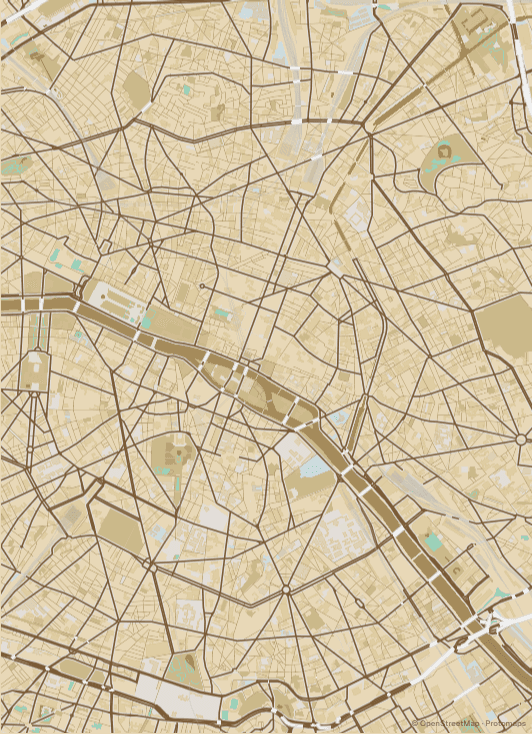
The étoiles are what make a Paris poster work
Haussmann's rebuilding left Paris with dozens of places where five, six or twelve streets converge on a single circle. The Arc de Triomphe is the famous one — twelve avenues radiating from Place Charles de Gaulle — but Place de la Nation, Place d'Italie and Place de la République all produce the same starburst. These junctions are the strongest graphic element on the map, so it is worth panning until at least one of them sits somewhere interesting in the frame rather than dead centre.
Where to put the river
The Seine runs roughly east to west, which means a portrait crop of central Paris will always have it slicing across the lower or middle third. Centre on Île de la Cité and you get both islands, the bridges, and the split channel around them — a lot of visual interest in a small area. Pull north instead and the river becomes a boundary along the bottom edge, with Montmartre's tangled contours filling the top.
The Périphérique is a natural border
The ring road traces the line of the old Thiers fortifications, so it forms an almost perfect closed loop around the twenty arrondissements. Zoom out far enough to include it and the poster gets a built-in frame — the city reads as a single defined shape rather than a crop that happens to stop. It is one of the few cities where zooming out actually improves the composition.
Where to centre a Paris poster
- Le Marais
- Pre-Haussmann street pattern — narrow, irregular, and a visible contrast against the boulevards that bound it.
- Montmartre
- The hill forces switchback streets, so the grid breaks into curves in a way nowhere else in Paris does.
- Saint-Germain-des-Prés
- Dense and fine-grained on the Left Bank, with Boulevard Saint-Germain curving through it.
- Latin Quarter
- Medieval lanes around the Sorbonne, with the Luxembourg gardens as a large green anchor.
- Canal Saint-Martin
- The canal's straight north–south line and its locks read clearly even at small sizes.
- Belleville
- Hilly, less regular, and far enough east that the frame picks up Père Lachaise.
Why Cyanotype suits Paris
Cyanotype suits Paris because the city's defining feature is line work, not colour. The blue ground pushes the boulevards and the Seine forward as pale strokes, which makes the étoile junctions read almost like a drafting diagram. Warmer palettes such as Sepia or Terracotta flatten those junctions into the background; Ink and Plotter are the two worth trying if you want something less saturated.
Printing and framing Paris
Portrait A2 is the natural choice for central Paris: the Seine sits across the lower third and Montmartre fills the top without cropping either. If you want the Périphérique's full loop, switch to square — the city is roughly as wide as it is tall inside the ring, and a square frame wastes the least paper on suburbs.
Every export is drawn at your chosen paper size rather than upscaled from a screenshot. See the full printing guide for sizes, DPI, bleed and crop marks.
Paris map poster questions
How do I fit all twenty arrondissements on one poster?
Zoom out until the Périphérique closes into a loop — around zoom 11.5. That captures every arrondissement plus the Bois de Boulogne and Bois de Vincennes on either side. Below that zoom the street labels start dropping out, so check the preview before exporting.
Can I centre the map on the Eiffel Tower instead of the city centre?
Yes — search for it directly, or click the map to drop a pin there. The Champ de Mars and the Trocadéro gardens give you two large green rectangles either side of the river, which is a stronger composition than it sounds.
Why does my Paris map look emptier than the real city?
At wider zooms the renderer drops minor streets to keep labels legible. Zoom in a step or two and the smaller Marais and Latin Quarter lanes come back. The exported file redraws at your chosen paper size, so the printed poster carries more detail than the on-screen preview suggests.